Experience professional-grade sound calibration by downloading the MultEQ v1.13.6 APK (Full Version) for your Android device. The Audyssey MultEQ Editor app is a specialized tool designed to help you customize the settings of your Denon or Marantz AV receiver for a perfect home theater setup. By using this application, you can bypass the standard automated setup and take full manual control over your audio environment to achieve studio-quality results.
This latest version of the Audyssey MultEQ Editor app offers an intuitive interface that makes complex sound engineering accessible to everyone. Whether you are adjusting for a small room or a dedicated cinema hall, the application provides the precision needed to eliminate acoustic distortions. It is widely considered an essential download for anyone seeking the highest fidelity audio output possible on Android using a convenient mobile interface.
ADVANCED CALIBRATION TOOLS
The MultEQ v1.13.6 APK (Full Version) enables users to view speaker detection results to ensure correct placement and wiring within their home theater. You can check individual subwoofer levels for an impactful bass response that doesn't overwhelm the rest of the soundstage. These visual feedback tools allow you to see exactly how your speakers are interacting with the furniture and walls in your room before you make any final adjustments.
TARGET CURVE EDITING
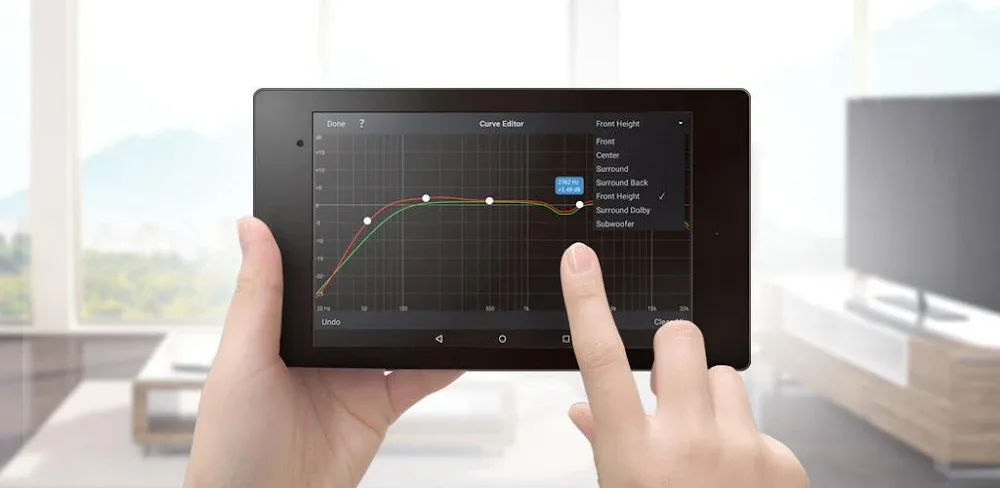
One of the standout features of the Audyssey MultEQ Editor app is the ability to edit the target curve for each channel pair. This allows for total customization of the frequency response, giving you the power to boost treble or enhance midrange frequencies based on your hearing. The app also includes a toggle for Midrange Compensation to make dialogue sound clearer or more natural depending on the specific acoustics of your listening space.
ENHANCED AUDIO FUNCTIONALITY
Using the MultEQ v1.13.6 APK (Full Version) gives you access to the full suite of Audyssey’s room correction technologies directly from your smartphone. You can save and load calibration files instantly, making it easy to switch between different sound profiles for movies, gaming, or high-fidelity music. This versatility ensures that your audio system is always optimized for the specific content you are enjoying at that moment.
To use the Audyssey MultEQ Editor app, simply connect your compatible AV receiver and Android phone to the same wireless network. The application will guide you through the measurement process and provide a detailed analysis of your speaker's performance. Downloading this MOD APK ensures you have all the premium features unlocked for a truly high-end listening experience without the typical hardware limitations.